Hi,
I have a 6-member 5700 L3 IRF switch that is connected to ESX hosts on downstream interfaces and connected upstream to a L3 PA firewall. I am having issues in that the hosts in the isolated VLANs can still communicate with each other, and i believe it has something to do with the config. I have several primary PVLANs and each primary PVLAN has 10 secondary VLANs (which includes 9 community PVLANs and 1 isolated PVLAN). Below is a diagram of the connections
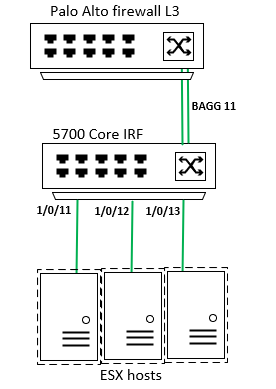
The configuration on the 5700 Core IRF is as follows:
vlan 100
private-vlan primary
private-vlan secondary 101 to 110
#
vlan 101
private-vlan isolated
#
vlan 102
#
vlan 103
#
vlan 104
#
vlan 105
#
vlan 106
#
vlan 107
#
vlan 108
#
vlan 109
#
vlan 110
#
vlan 200
private-vlan primary
private-vlan secondary 201 to 210
#
vlan 201
private-vlan isolated
#
vlan 202
#
vlan 203
#
vlan 204
#
vlan 205
#
vlan 206
#
vlan 207
#
vlan 208
#
vlan 209
#
vlan 210
#
interface Bridge-Aggregation11
description uplink to PA
port link-type trunk
port trunk permit vlan 1 100 to 110 200 to 210
port private-vlan 100 200 trunk promiscuous
#
interface Ten-GigabitEthernet1/0/11
description downlink to ESX hosts
port link-type hybrid
port hybrid vlan 100 to 110 200 to 210 tagged
port hybrid vlan 1 untagged
port private-vlan 100 200 trunk promiscuous
#
Interfaces 1/0/12 and 1/0/13 have the same config as interface 1/0/11. I believe it has to do with having set the downlink as a promiscuous port. However, when i remove the promiscuous trunk on the downlink and try and set the downlink interface to:
port private-vlan 101 to 110 201 to 210 trunk secondary
it states that only 1 secondary vlan can be associated with a primary vlan.
Should you be able to set more than one secondary vlan with a primary vlan, and if so, what config changes do i need to do to make this work? Any help in resolving this config would be appreciated
Regards,
James