This is very strange behavior you encounter. Here is part from documentation about idle-timeout parameter:
I'm glad you resolve your problem.
Original Message:
Sent: Jul 07, 2025 06:06 PM
From: ezrat
Subject: RADIUS Configuration Issues on HP5130 Running Comware 7
Forgot to update with my solution.
I was able to figure it out with the help of HPE support. I had added this line
idle-timeout 0 0
This was actually causing the connection to timeout immediately. I believe in Cisco world setting the timeout to 0 means it will never close the session but not for HPE. At that point I had already fixed my RADIUS server to provide the correct attributes so once I changed the timeout to 30 min it worked right away.
Here is my current working config:
line vty 0 15 authentication-mode scheme user-role network-operator protocol inbound ssh
radius scheme my_radius primary authentication [radius_ip] key cipher ***** primary accounting [radius_ip] key cipher ***** key authentication cipher ***** user-name-format without-domain nas-ip [nas_ip]#radius scheme system user-name-format without-domain#domain my_domain authentication login radius-scheme my_radius local authorization login radius-scheme my_radius local accounting login radius-scheme my_radius local authorization default radius-scheme my_radius local accounting default radius-scheme my_radius local#domain system# domain default enable my_domain#
Original Message:
Sent: Dec 10, 2024 09:51 AM
From: ezrat
Subject: RADIUS Configuration Issues on HP5130 Running Comware 7
I have matched your configuration exactly and still see the same immediate disconnection behavior. I am going to put in a ticket with HP and see if they can figure it out.
Thanks for your help! I will update the discussion with a final solution when I get one.
Original Message:
Sent: Dec 10, 2024 04:06 AM
From: GorazdKikelj
Subject: RADIUS Configuration Issues on HP5130 Running Comware 7
Hi Ezra.
I have many 5130 switches authenticated via Clearpass for management with no problems. The only real difference I see in your configuration is, that you are using system domain. I always leave system domain unchanged to provide me possibility to locally logged to the switch in the case of a need.
radius scheme accesssecurity
primary authentication <ip> key cipher <key>
primary accounting <ip> key cipher <key>
accounting-on enable
accounting-on extended
user-name-format without-domain
#
radius scheme system
user-name-format without-domain
#
radius dynamic-author server
client ip 10.<ip> key cipher <key>
#
domain accesssecurity
authentication login radius-scheme accesssecurity local
authorization login radius-scheme accesssecurity local
accounting login radius-scheme accesssecurity local
authentication lan-access radius-scheme accesssecurity local
authorization lan-access radius-scheme accesssecurity local
accounting lan-access radius-scheme accesssecurity local
authorization default radius-scheme accesssecurity local
accounting default radius-scheme accesssecurity local
#
domain system
#
domain default enable accesssecurity
Try to put radius configuration into separate domain and use this new domain as default domain and leave system domain original.
To login into nondefault domain just use user@domain format.
Best, Gorazd
------------------------------
Gorazd Kikelj
MVP Guru 2024
Original Message:
Sent: Dec 09, 2024 03:31 PM
From: ezrat
Subject: RADIUS Configuration Issues on HP5130 Running Comware 7
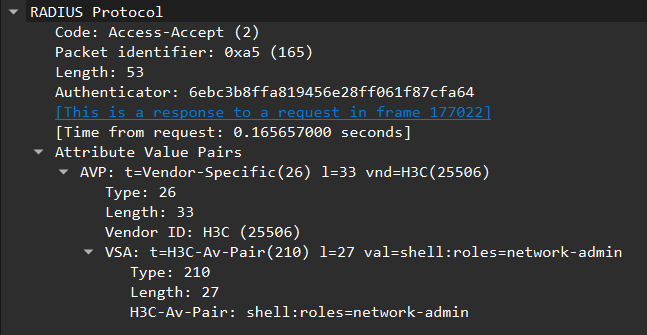
I believe I have my RADIUS sever sending the correct attribute now, but still no luck on logging in with SSH.
Original Message:
Sent: Dec 09, 2024 06:41 AM
From: GorazdKikelj
Subject: RADIUS Configuration Issues on HP5130 Running Comware 7
Hi.
I don't think it is related, but for test try to add " idle-timeout 0 0" into line vty
line vty 0 15
 authentication-mode scheme
 user-role network-operator
 protocol inbound ssh
idle-timeout 0 0
Also check, what you send from your RADIUS server.
You should send H3C-AVPair
| 1. | Radius:H3C | H3C-AVPair | = | shell:roles=network-admin |
Best, Gorazd
------------------------------
Gorazd Kikelj
MVP Guru 2024
Original Message:
Sent: Dec 05, 2024 01:39 PM
From: ezrat
Subject: RADIUS Configuration Issues on HP5130 Running Comware 7
I am attempting to configure RADIUS login for my HP5130 switch. I can successfully authenticate to the RADIUS server, but as soon as I connect to the switch, I get disconnected again.
Here is my configuration:
#line vty 0 15 authentication-mode scheme user-role network-operator protocol inbound ssh#line vty 16 63 user-role network-operator#radius scheme myRadius primary authentication ***** primary authorization ***** key authentication cipher ********* user-name-format without-domain#radius scheme system user-name-format without-domain#domain system authentication login radius-scheme myRadius local authorization login radius-scheme myRadius local accounting login none# domain default enable system
Here are some example logs:
%Dec 5 12:35:52:340 2024 HP-5130 SSHS/6/SSHS_DISCONNECT: SSH user ADMIN(IP: *****) disconnected from the server.%Dec 5 12:35:52:340 2024 HP-5130 SSHS/6/SSHS_LOG: User ADMIN logged out from ***** port 54853.%Dec 5 12:35:52:117 2024 HP-5130 SSHS/6/SSHS_CONNECT: SSH user ADMIN (IP: *****) connected to the server successfully.%Dec 5 12:35:52:036 2024 HP-5130 SSHS/6/SSHS_LOG: Accepted password for ADMIN from ***** port 54853 ssh2.
Any help would be appreciated!