Comware

 View Only
  • 1.  RADIUS configuration with NPS

    Posted Feb 06, 2026 02:51 AM

    Hi community,

    I have a HPE Comware 48SFP28 8QSFP28 5945 switch that I will need to set up RADIUS authentication and authorization on. We are planning to use Microsoft Network Policy Server (NPS) as the RADIUS server. 

    While I've taken a look at the HPE Comware manuals to understand how to set up RADIUS on the switch side, I was wondering whether there are any vendor-specific attributes that we need to set on NPS to get authorization to work properly with the switch.

    Would be a great help if anyone with experience setting up NPS with Comware could give some advice on this as well as any tweaks/caveats that we need to be aware of.


    -------------------------------------------


  • 2.  RE: RADIUS configuration with NPS

    Posted Feb 06, 2026 02:59 AM

    IETF attributes will provide most of what you need to send vlan and acls. Look into wired enforcement guide for examples. You will find latest version on networking support portal.

    Best, Gorazd


    ------------------------------
    Gorazd Kikelj
    MVP Guru 2025
    ------------------------------


  • 3.  RE: RADIUS configuration with NPS

    Posted Mar 08, 2026 06:59 AM
    Edited by Dassant Mar 08, 2026 07:13 AM

    Hi @marumaru0813

    If i understand correctly you want to configure AAA for device login using windows NPS. Please use follwing config 

    # Enable the SSH service.

    ssh server enable

    # Enable scheme authentication for user lines VTY

    line vty 0 63

    authentication-mode scheme

    #Create a RADIUS scheme and configure authentication server 

    radius scheme abc

    primary authentication <radius-server-ip> key simple <key>

    primary accounting <radius-server-ip> key simple <key>

    user-name-format without-domain

    nas-ip <Switch-IP>

    #Create domain (aaa) and configure authentication, authorization, and accounting methods for login users. (Note : this is not actual domain. this just for switch and this domain name is localy significant )

    domain aaa

    authentication login radius-scheme abc local

    authorization login radius-scheme abc local

    accounting login radius-scheme abc local

    # Enable radius domain default for login

    domain default enable aaa


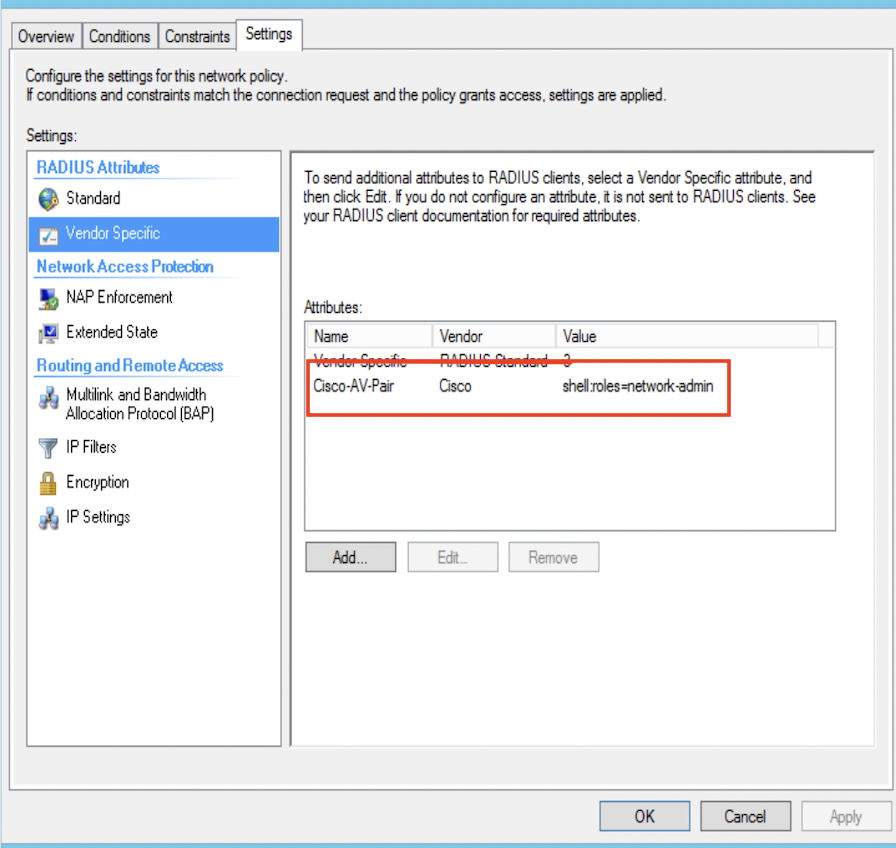
    For authorization attribuite in NPS please configure Cisco-AV-Pair

    value  is shell:roles=network-admin

    network-admin is the role which will be applied for the login user. You can configure as per your requrements.
    In case you are facing issue, Please open a support case. 


    ------------------------------
    Thank you

    Santanu
    ------------------------------